
Skip to content

HR Case Management

HR case management built for HR, not IT

Give every employee question an owner, a clock and a paper trail. Configured by your HR team, not by IT.
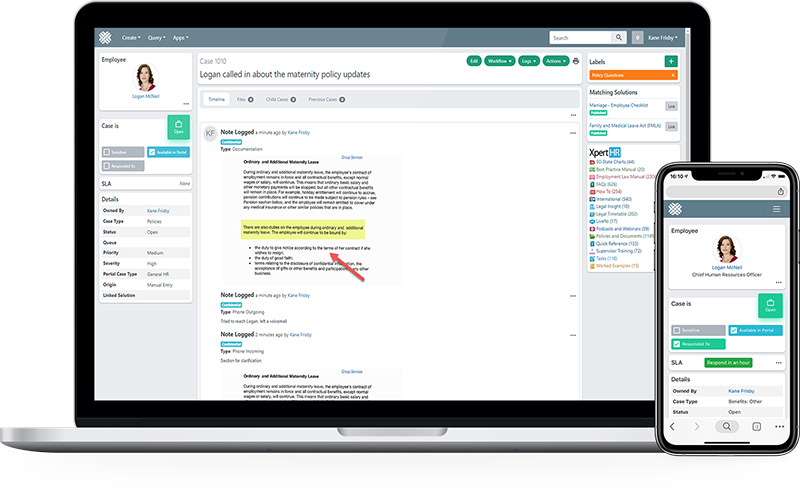
Dovetail HR case management console showing the case queue, employee record and resolution timeline

See it working

See case management in action

From an employee raising a question to a documented, closed case, end to end.

Captions available. Ask us for a transcript.

#1

Five consecutive years in HR Service Delivery

Sapient Insights 2025-2026 HR Systems Survey, 28th edition. 10,000+ HR professionals across 4,670 organisations.

8 months

Payback period, fastest in the category

G2 payback metric, against a category average of 14 months.

3 of 3

Enterprise categories ranked #1

HR Service Delivery Help Desk, Portal and Content Management. A clean sweep.

What it does

From inbox chaos to a service operation

Four capabilities that decide whether an HR service desk scales or stalls.

Capture from anywhere

Email to case, portal, chat, Teams and Slack all land in the same queue with the same rules.

One queue

Route and escalate

Category, region and sensitivity rules put each case with the right person first time.

Right owner first time

Resolve with context

Live HCM worker data, case history and knowledge search sit inside the case.

No tabbing between systems

Prove the service level

SLA clocks, dashboards and scheduled reports your exec team will actually read.

Evidence, not anecdote

Case handling

Correspondence that documents itself

Email to case threads every reply back onto the record automatically. No printing to PDF, no uploading attachments to a folder, no reconstructing what was said six months later.

  • Templates for the answers your team gives every week
  • Internal notes separated from employee-facing correspondence
  • Hide sensitive notes without deleting the audit record
  • Full timeline of every action, actor and timestamp
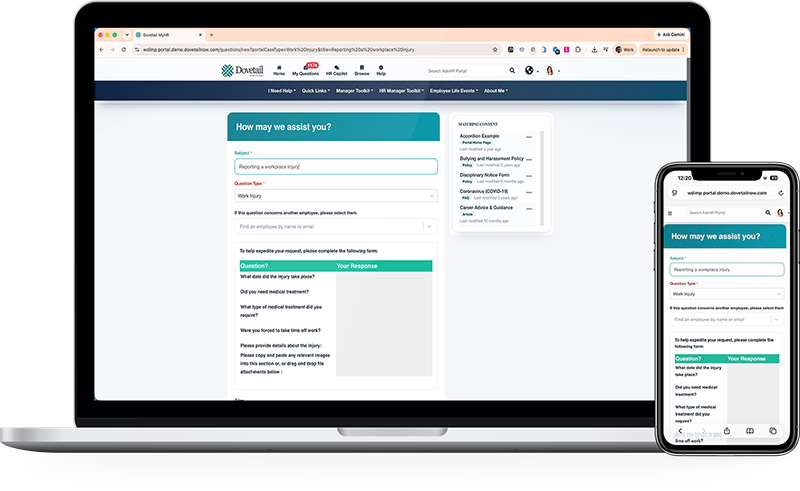
See the employee portal

Dovetail Ask HR form where an employee raises a workplace injury case, with matching knowledge articles alongside

Reporting

Service levels you can take to the board

Standard dashboards on day one, a report designer when you outgrow them, and scheduled distribution so leadership gets the numbers without asking.

  • Volume, resolution time and SLA attainment by team and category
  • Ad hoc and crosstab reporting without a BI project
  • Scheduled export to Excel, Word and PDF
  • Permissions so managers see their own teams only
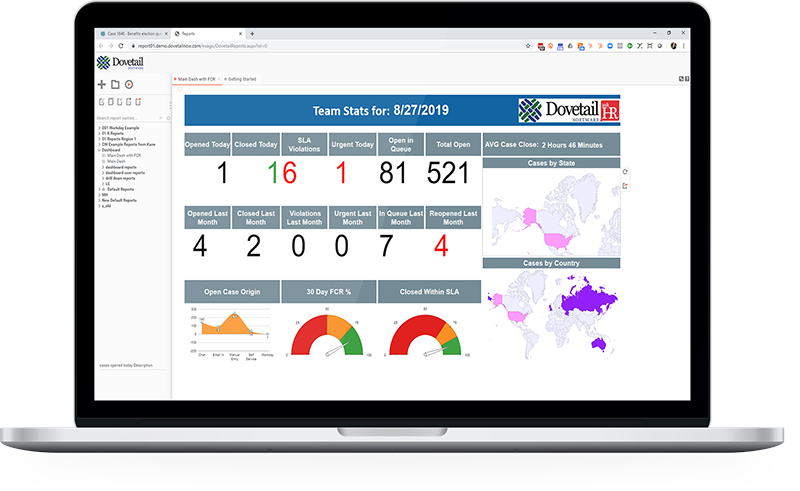
Explore reporting

Dovetail HR case management reporting dashboard with service level and volume analytics

I love the new hide feature in the case notes as accidents happen all the time. But emailing within the case is my favourite feature of all time. Before Dovetail I had to print each email as a PDF and upload it to the case file. Now any replies are automatically tracked, making properly documenting cases a breeze with no extra work.

Jessica BerdaguerLeave & Accommodation Partner · Swire Coca-Cola

Common questions

Do we need IT to configure case management?

No. Categories, fields, workflows, SLAs and reports are configured by HR through the admin interface. IT is needed for SSO and the initial HCM connection, then not for ongoing change.

How does it handle sensitive cases?

Permission models restrict visibility by team, category and record. Notes can be hidden from wider view without being removed from the audit trail, which matters when a case becomes a formal matter.

Can employees see their own case status?

Yes. Case tracking in the employee portal removes the chasing emails that make up a meaningful share of tier 1 volume.

What happens to our existing case history?

Data migration from your current system is scoped and quoted as part of implementation.

See case management against your own process

Bring a real inquiry type your team handles today and we will walk it end to end.